目录
部署工具
[!NOTE] Highlights information that users should take into account, even when skimming.
[!TIP] Optional information to help a user be more successful.
[!IMPORTANT] Crucial information necessary for users to succeed.
[!WARNING] Critical content demanding immediate user attention due to potential risks.
[!CAUTION] Negative potential consequences of an action.
[!NOTE] Negative potential consequences of an action. TODO
版本选择
操作系统
架构优化
网络插件
服务网关
存储方案
日志方案
监控方案
持续集成
镜像管理
镜像管理
性能测试
集群优化
周边生态
- Helm
- Terraform
Helm

项目背景
随着人工智能、机器学习等领域快速发展出现的算力匮乏,以及互联网热点活动对运营伸缩能力的刚性需求,还有各种复杂架构系统导致的维护成本的增加,使人们对云服务的需求也从 基础设施即服务(IasS),演进到 平台即服务(PaaS),再到最新的 软件即服务(SaaS),无论在广度上还是深度上都有了更高的要求,云计算领域中多云和混合云成为了不可避免的趋势。
在多云和混合云的环境下,使用 基础设施即代码(IaC),如何把软件工程的最佳实践,用于管理云相关的运维活动,就成了一个迫切需要解决的问题,而 Terraform 就是针对这个问题而出现的一个解决方案。
设计理念
Terraform 是一个由 HashiCorp 公司创建的开源工具,它可以让用户使用简单的声明性语言将基础设施定义为代码,并通过一些命令来部署和管理基于各种公有云(如 Amazon Web Service、MicrosoftAzure、Google Cloud Platform、DigitalOcean)、私有云和虚拟化平台(如 OpenStack、VMWare)的基础设施。
DevOps
DevOps 不应该只是团队名称、职称或特定技术,相反它更应该代表过程、思想和技术。
DevOps 有四大核心价值:文化(culture)、自动化(automation)、度量(measurement) 和 共享(sharing),有时缩写为 CAMS
基础设施即代码
IaC 提供了一种更好的选择,让计算机处理擅长的事情 (自动化),让开发人员从事擅长的任务 (代码开发)。
IaC 工具的分类:配置管理(configuration management)、编排(orchestration)、服务开通(provisioning)和服务器模板(servertemplating)
- 专项脚本
- 配置管理工具
- 服务器模板工具
- 编排工具
- 服务开通工具
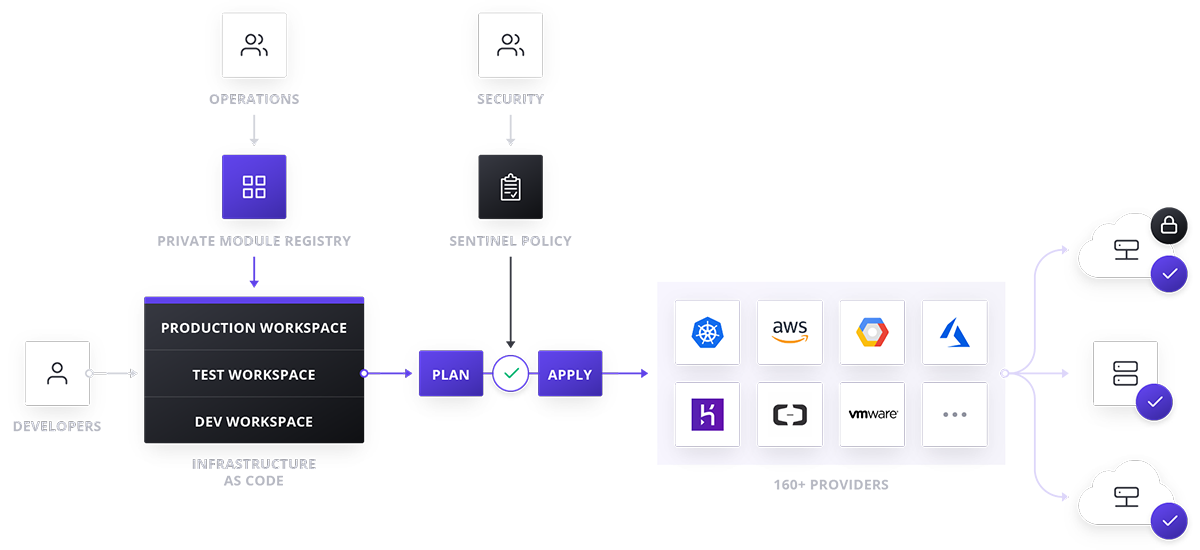
基本概念
- HCL: HashiCorp Configuration Language,HCL 扩展名为
.tf
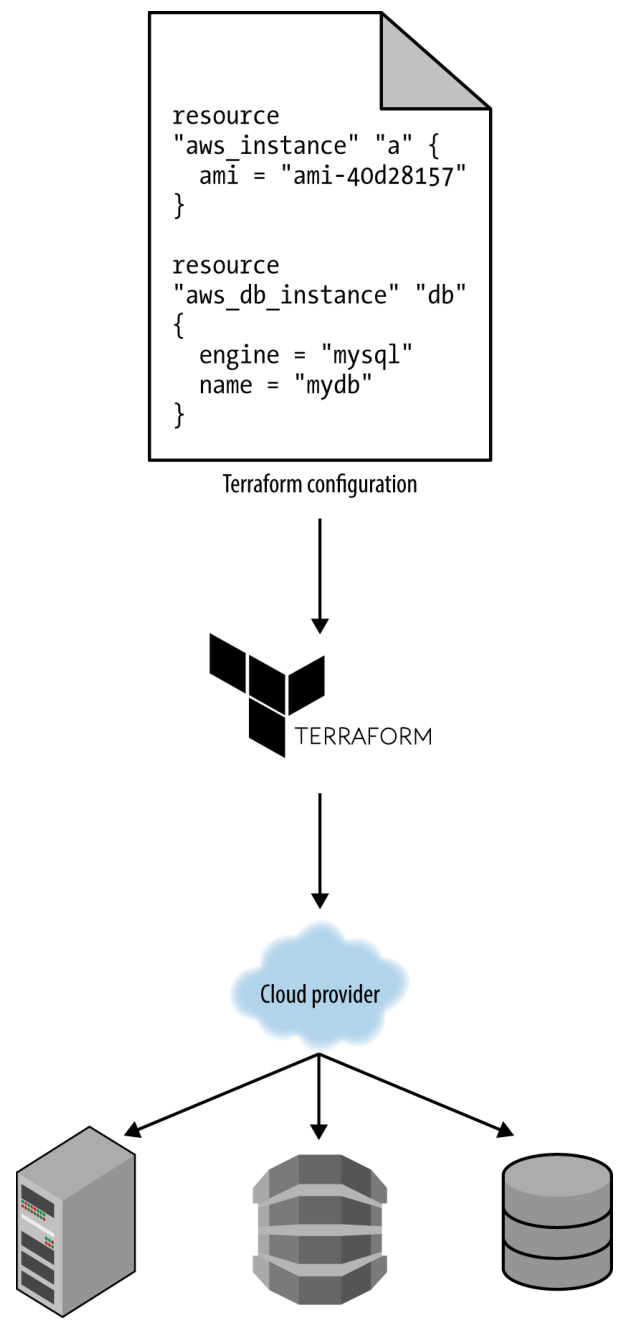
HCL 是一种声明性语言,目标是描述所需的基础设施,Terraform将自动计算生成创建它的方法
- state
- provider
- ami
- ASG: AWS Auto Scaling Group
工作原理
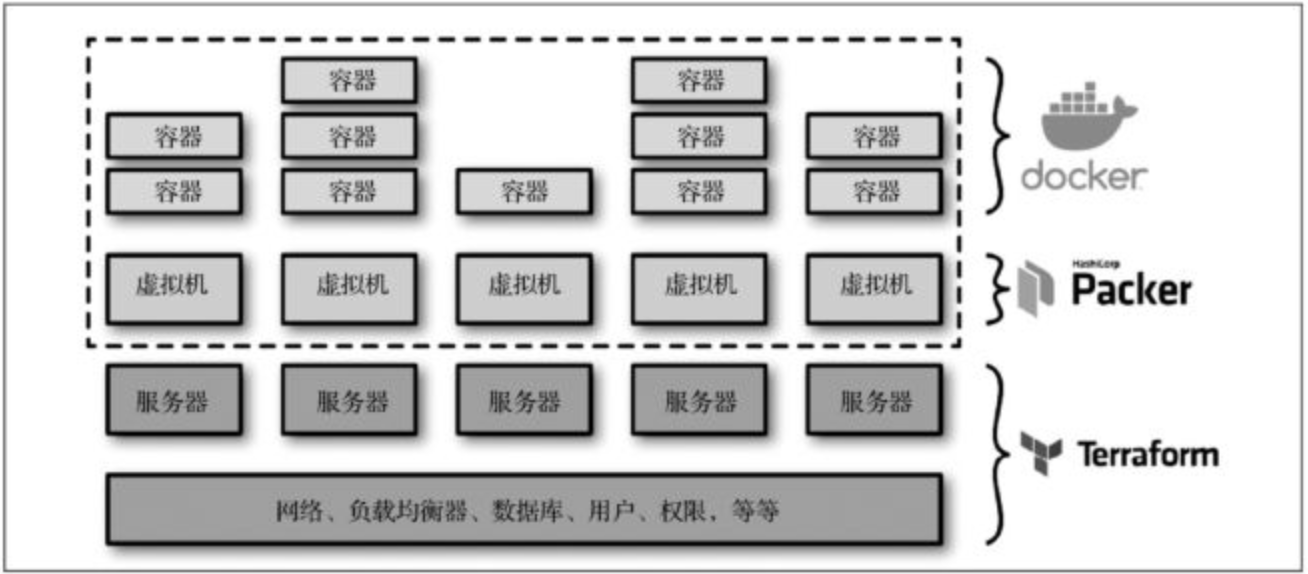
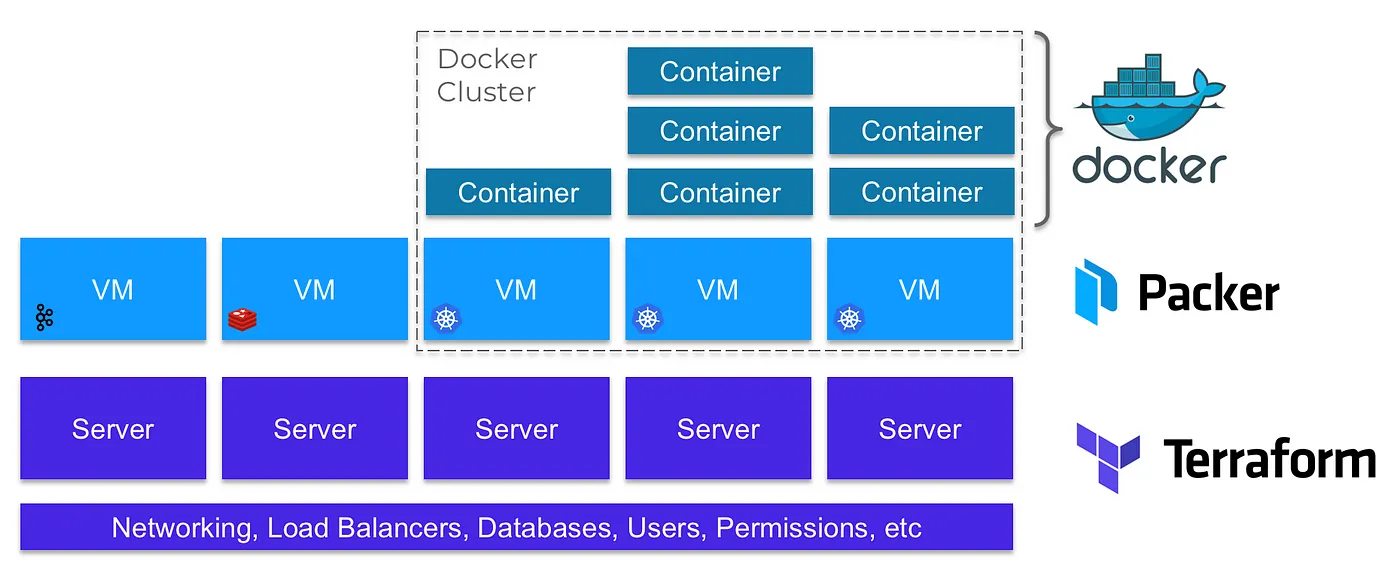
无主控服务器模式和无代理软件架构
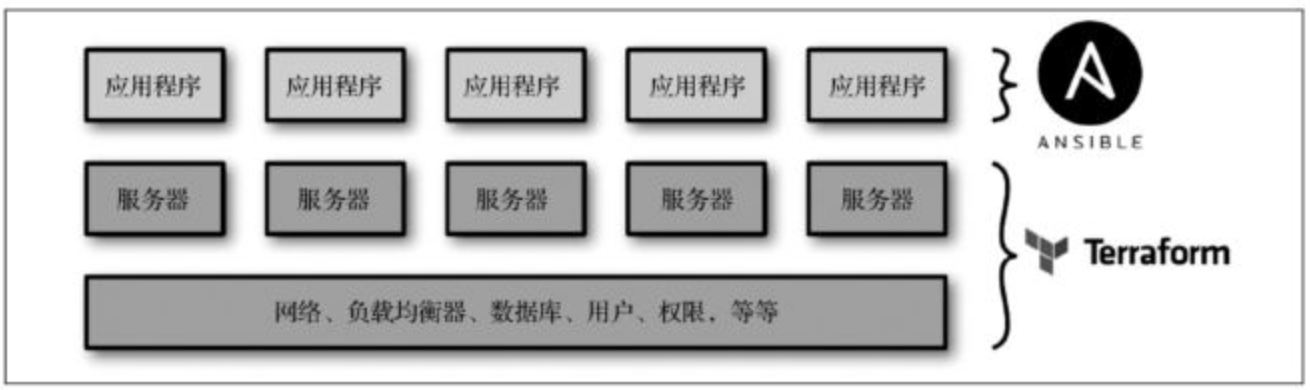
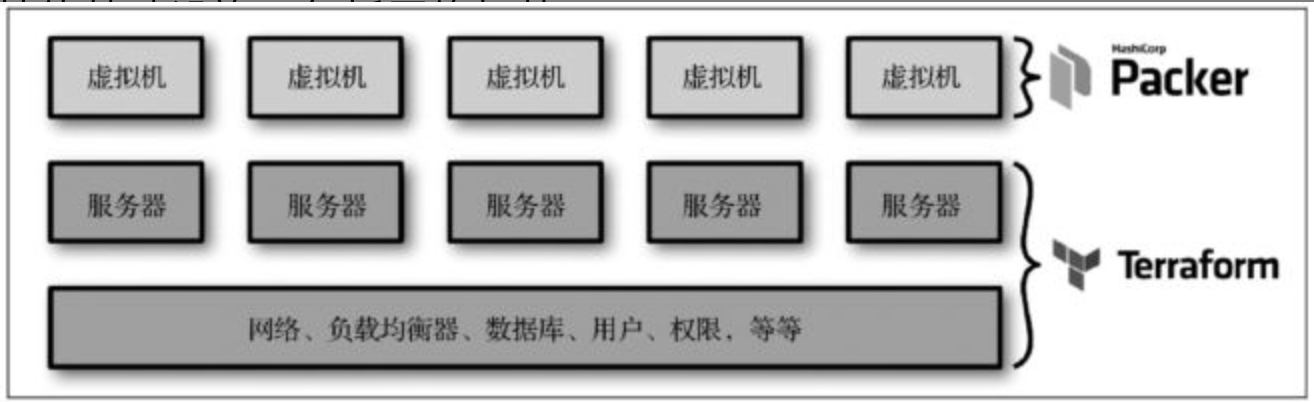
同时使用多个工具工作流
快速开始
安装方式
❯ brew tap hashicorp/tap
❯ brew install hashicorp/tap/terraform
- 其他平台安装方式参见:Install | Terraform | HashiCorp
❯ terraform

Usage: terraform [global options] <subcommand> [args]
The available commands for execution are listed below.
The primary workflow commands are given first, followed by
less common or more advanced commands.

Main commands:
  init          Prepare your working directory for other commands
  validate      Check whether the configuration is valid
  plan          Show changes required by the current configuration
  apply         Create or update infrastructure
  destroy       Destroy previously-created infrastructure

All other commands:
  console       Try Terraform expressions at an interactive command prompt
  fmt           Reformat your configuration in the standard style
  force-unlock  Release a stuck lock on the current workspace
  get           Install or upgrade remote Terraform modules
  graph         Generate a Graphviz graph of the steps in an operation
  import        Associate existing infrastructure with a Terraform resource
  login         Obtain and save credentials for a remote host
  logout        Remove locally-stored credentials for a remote host
  metadata      Metadata related commands
  output        Show output values from your root module
  providers     Show the providers required for this configuration
  refresh       Update the state to match remote systems
  show          Show the current state or a saved plan
  state         Advanced state management
  taint         Mark a resource instance as not fully functional
  test          Experimental support for module integration testing
  untaint       Remove the 'tainted' state from a resource instance
  version       Show the current Terraform version
  workspace     Workspace management
身份验证
除了通过环境变量进行身份验证,Terraform 也支持与所有 AWS 命令行工具和 SDK 工具相同的身份验证机制,
使用 $HOME/.aws/credentials 文件中的密钥,密钥信息可以通过在 AWS 命令行或 IAM 角色上运行 configure 命令自动生成
export AWS_ACCESS_KEY_ID="*****"
export AWS_SECRET_ACCESS_KEY="*****"
常用命令
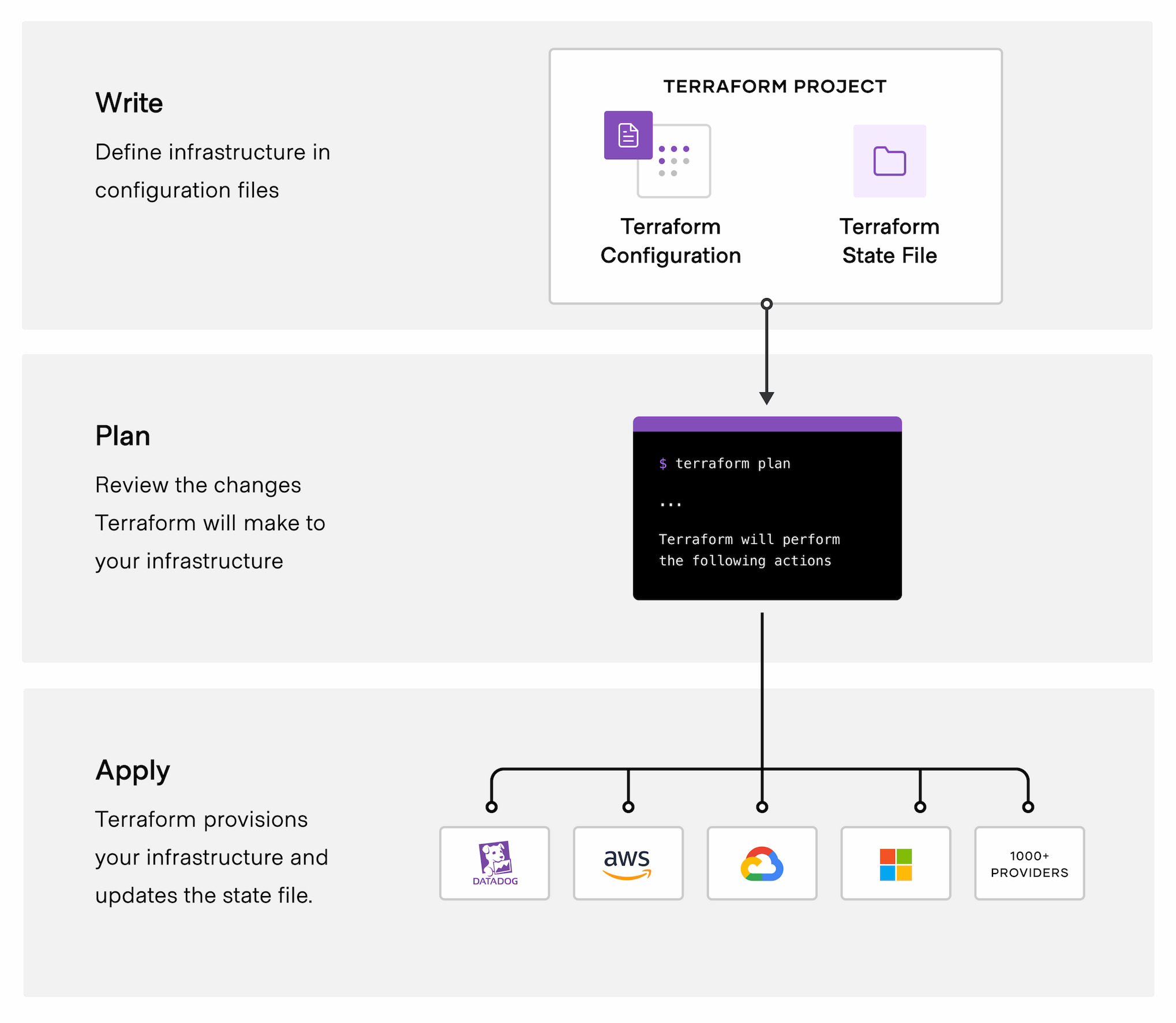
❯ terraform init     用于初始化下载云提供商代码
❯ terraform plan     用于对 Terraform 代码发布前进行预览及检查
❯ terraform apply    用于创建代码声明的资源
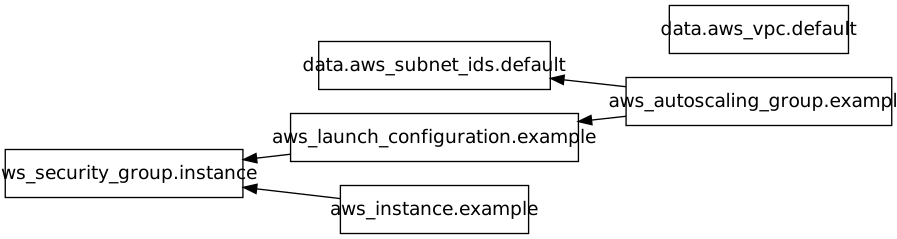
❯ terraform graph    显示资源依赖关系图
❯ terraform output   输出所定义的变量
❯ terraform output <VARIABLE_NAME>
❯ terraform test     用于核验测试配置文件正确性
❯ terraform import   用于将已存在的基础设施添加到状态文件中以便于后续管理
❯ terraform state
❯ terraform console  用于开启互式控制台
❯ terraform destory  用于进行环境海清理
开发指南
资源声明
provider " aws" {
  region = " us-east-2"
}
- 位于相同地理区域的多个数据中心被统一命名为一个区域(region)
- 每个区域包括多个相互隔离的数据中心,称为可用区(Availability Zones,AZ)
在 Terraform 中创建资源的一般语法如下:
# PROVIDER 是提供商的名称(例如aws)
# TYPE 是在该提供商中创建的资源类型
# NAME 是一个标识符,你可以在整个 Terraform 代码块范围内通过这个标识符引用该资源
# CONFIG 包括一个或多个特定于该资源的参数或参数组

resource "<PROVIDER>_<TYPE>" " <NAME>" {
  [CONFIG ...]
}
- 示例:
# ami 运行在EC2实例上的 Amazon Machine Image(AMI)

resource "aws_instance" "example" {
  ami = "ami-0c55b159cbfafe1f0"
  instance_type = "t2.micro"
}
❯ terraform init
Initializing the backend...
Initializing provider plugins...
- Finding latest version of hashicorp/aws...
- Installing hashicorp/aws v5.62.0...
- Installed hashicorp/aws v5.62.0 (signed by HashiCorp)
Terraform has created a lock file .terraform.lock.hcl to record the provider
selections it made above. Include this file in your version control repository
so that Terraform can guarantee to make the same selections by default when
you run "terraform init" in the future.

Terraform has been successfully initialized!

You may now begin working with Terraform. Try running "terraform plan" to see
any changes that are required for your infrastructure. All Terraform commands
should now work.

If you ever set or change modules or backend configuration for Terraform,
rerun this command to reinitialize your working directory. If you forget, other
commands will detect it and remind you to do so if necessary.
terraform init 命令会将提供商代码将被下载到 .terraform 中,该文件夹是 Terraform 的临时目录
❯ tree .terraform
.terraform
└── providers
    └── registry.terraform.io
        └── hashicorp
            └── aws
                └── 5.62.0
                    └── darwin_arm64
                        ├── LICENSE.txt
                        └── terraform-provider-aws_v5.62.0_x5
资源引用
如果要访问安全组资源的ID,需要使用资源属性引用(resource attribute reference),该引用的语法如下
<PROVIDER>_<TYPE>.<NAME>.<ATTRIBUTE>
- 示例
vpc_security_group_ids = [aws_security_group.instance.id]

# aws_security_group define
resource "aws_security_group" "instance" {
    name = "terraform-example-instance"
    ingress {
        from_port =8080
        to_port = 8080
        protocol = "TCP"
        cidr_blocks = ["0.0.0.0/0"]
    }
}
- 通过
terraform graph可查看所声明资源的依赖关系
❯ terraform graph | dot -T png > relate.png
❯ curl http:// <EC2_INSTANCE_PUBLIC_IP>:8080
Hello, World
变量声明
通过文本声明
# type: 允许对用户输入的变量类型进行强制约束。Terraform支持许多类型约束,
# 包括 string、number、bool、list、map、set、object、tuple、any

variable "NAME" {
  type        = string
  default     = "VALUE"
  description = "DESCRIPTION"
}
- 声明
Object类型变量
variable "object_example" {
  description= "An example of a structural type in Terraform"

  type = object({
    name = string
    age = number
    tags = list(string)
    enabled = bool
  })

  default = {
    name = "value1"
    age = 42
    tags = ["a", "b", "c"]
    enabled = true
  }
}
环境变量声明
export TF_VAR_<name>=<VALUE>
引用及输出变量
# 引用变量
var.<VARIABLE_NAME>

# 输出变量
output "<NAME>" {
  value = <VALUE>
  [CONFIG ...]
}
CONFIG包含两个可选参数:
description:描述参数可以被用来记录输出变量的数据类型。senstitive:如果此参数设置为 true,Terraform 在运行terraform apply指令时,不会在日志中记录输出信息。这是一种非常有用的方式,可以用来防止记录输出变量中的敏感信息,例如密码或私钥等。
❯ terraform output
定义 ASG
aws_launch_configuration 资源使用了与 aws_instance 资源几乎一模一样的两个参数,只是名称略有不同:ami 参数在这里被称为image_id,vpc_security_group_ids 参数现在是 security_groups。
resource "aws_autoscaling_group" "example" {
  launch_configuration = aws_launch_configuration.example.name
  min_size             = 2
  max_size             = 5

  tag {
    key                 = "Name"
    value               = "terraform-asg-example"
    propagate_at_launch = true
  }
}
每个 Terraform 资源都支持生命周期设置,这些设置用于定义如何创建、更新和删除该资源。一个特别有用的生命周期设置是 create_before_destroy。如果将 create_before_destroy 设置为true,那么 Terraform 将反转其替换资源的顺序,首先创建替换资源(包括将指向旧资源的所有外部引用,更新为指向替换资源),然后删除旧资源。
lifecycle {
  create_before_destroy = true
}
定义子网信息
为了使 ASG 正常工作,还需要添加的参数:subnet_ids,这个参数定义ASG部署EC2实例时的VPC子网信息
子网定义的最佳实践是通过 **数据源(data source)**来获取 AWS 账户中可用的子网列表
# 数据源的定义
data "<PROVIDER>_<TYPE>" "NAME>" {
  [CONFIG ...]
}

# 数据源的引用
data.<PROVIDER>_<TYPE>.<NAME>.<ATTRIBUTE>
完整示例
resource "aws_autoscaling_group" "example" {
  launch_configuration = aws_launch_configuration.example.name
  vpc_zone_identifier  = data.aws_subnet_ids.default.ids

  min_size = 2
  max_size = 5

  tag {
    key                 = "Name"
    value               = "terraform-asg-example"
    propagate_at_launch = true
  }

  lifecycle {
    create_before_destroy = true
  }
}

data "aws_vpc" "default" {
  default = true
}

data "aws_subnet_ids" "default" {
  vpc_ids = data.aws_vpc.default.id
}
定义负载均衡
AWS 提供了3种不同类型的负载均衡器
- 应用程序负载均衡器(ALB)
- 网络负载均衡器(NLB)
- 经典负载均衡器(CLB)

resource "aws_lb" "example" {
  name               = "value"
  subnets            = data.aws_subnet_ids.default.ids
  load_balancer_type = "application"
  security_groups    = [aws_security_group.alb.id]
}

resource "aws_lb_listener" "http" {
  port              = 80
  protocol          = "НТТР"
  load_balancer_arn = aws_lb.example.arn

  default_action {
    type = "fixed-response"

    fixed_response {
      status_code  = 404
      content_type = "text/plain"
      message_body = "404: page not found"
    }
  }
}

resource "aws_security_group" "alb" {
  name = "terraform-example-alb"

  # 允许入站的 HTTP 请求
  ingress {
    from_port   = 80
    to_port     = 80
    protocol    = "tcp"
    cidr_blocks = ["0.0.0.0/0"]
  }

  # 允许所有出站请求
  egress {
    from_port   = 0
    to_port     = 0
    protocol    = "-1"
    cidr_blocks = ["0.0.0.0/0"]
  }
}

resource "aws_lb_target_group" "asg" {
  name     = "terraform-asg-example"
  port     = var.server_port
  protocol = "НТТР"
  vpc_id   = data.aws_vpc.default.id

  health_check {
    path                = "/"
    protocol            = "НТТР"
    matcher             = "200"
    interval            = 15
    timeout             = 3
    healthy_threshold   = 2
    unhealthy_threshold = 2
  }
}

resource "aws_lb_listener_rule" "asg" {
  listener_arn = aws_lb_listener.http.arn
  priority     = 100

  condition {
    # field  = "path-pattern"
    # values = ["*"]
    path_pattern {
      values = ["*"]
    }
  }

  action {
    type             = "forward"
    target_group_arn = aws_lb_target_group.asg.arn
  }
}
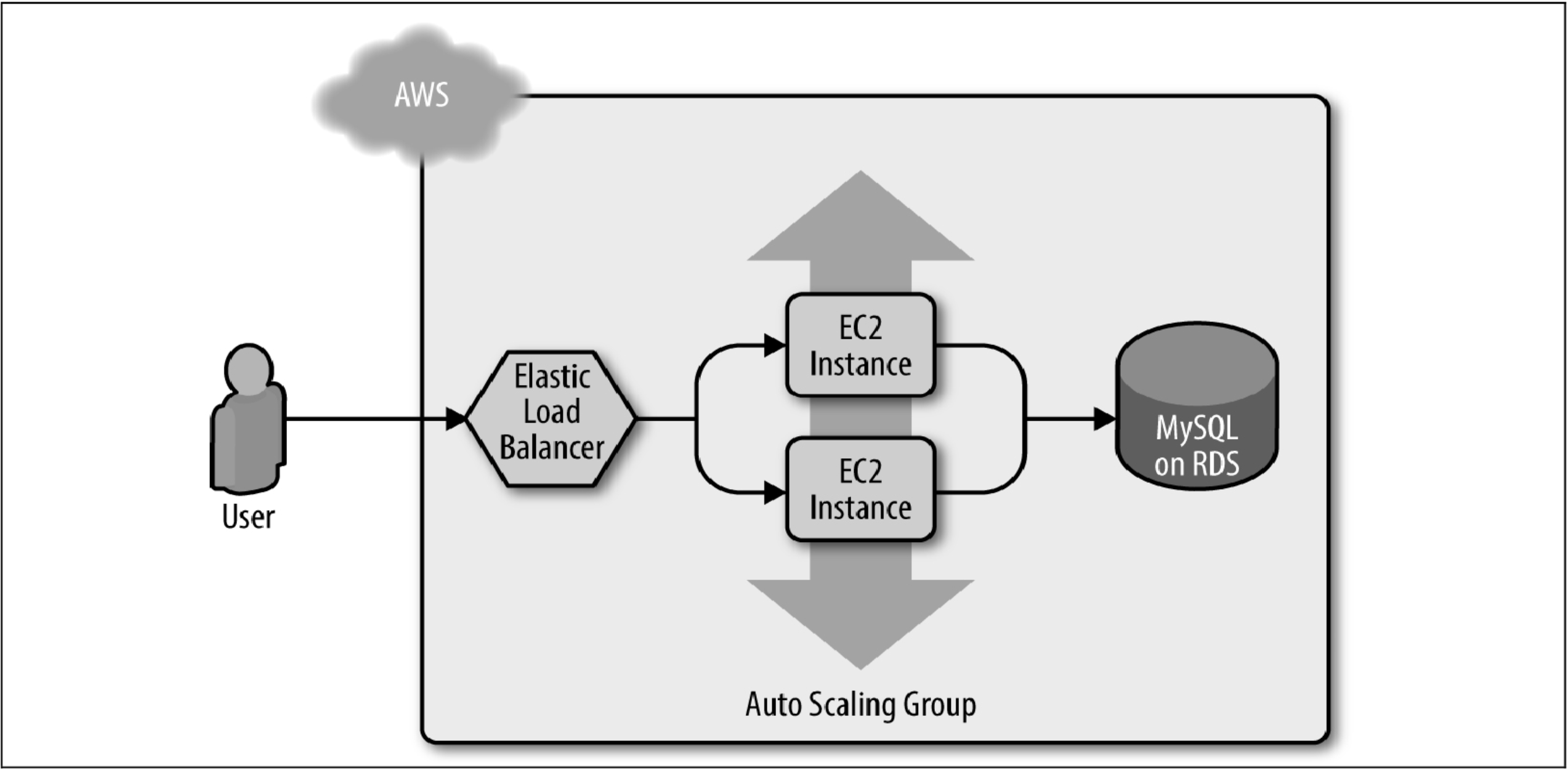
整体部署架构
状态管理
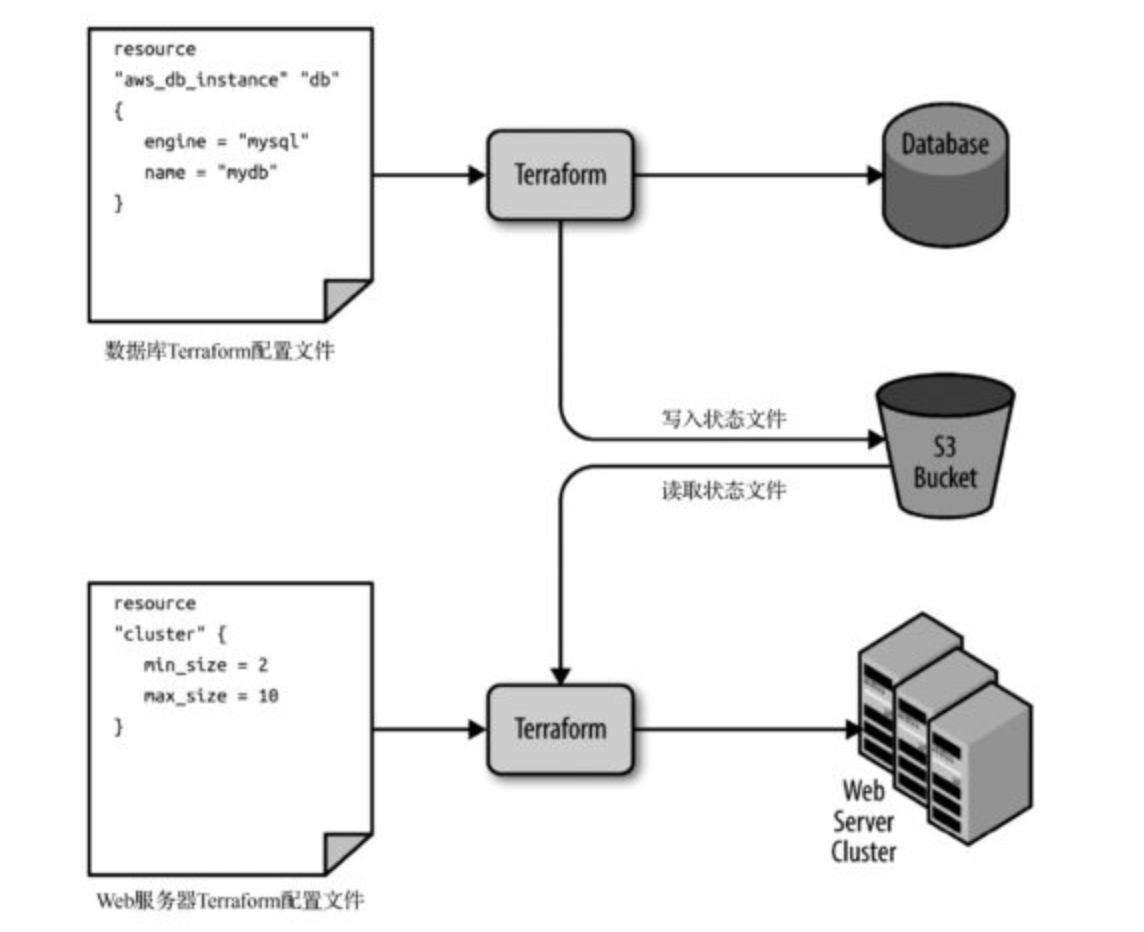
你在 /foo/bar 文件夹中运行 Terraform 命令时,默认将创建状态文件 /foo/bar/terraform.tfstate,状态文件使用自定义JSON格式,记录了资源配置文件中的定义与现实世界中的部署的对应关系。
本地状态文件机制面临如下问题:
- 共享存储
- 锁机制
- 安全问题
将纯文本格式的机密信息存储在任何地方都不是一个好主意,包括版本控制系统。
截至2019年5月,这仍是 Terraform 一个未解决的问题。远程后端成功地解决了刚才列出的3个问题。
定义后端语法
terraform {
  backend "‹BACKEND NAME>" {
    [CONFIG...]
  }
}
定义 S3 后端
terraform {
  backend "s3" {
    # 请用你的 bucket 名称替换
    bucket = "terraform-up-and-running-state"
    key    = "global/s3/terraform. tfstate"
    region = "us-east-2"

    # 请用你的 DynamoDB 表名称替换
    dynamodb_table = "terraform-up-and-running-locks"
    encrypt        = true
  }
}
后端注意事项
- 要使用 DynamoDB 实现状态文件的锁定功能,必须创建一个具有主键名为
LockID的 DynamoDB 表 - Terraform 的 backend 代码块中不允许使用任何变量或引用
- 永远不要手动更新 Terraform 状态文件,而要使用
terraform state命令来完成更新
根对后端不能引用变更的问题可通过 部分配置(partial configuration) 在代码中省略某些 backend 参数的静态设置,并在调用 terraform init 命令时通过 backend-config 命令行传递参数的方式解决。
❯ terraform init -backend-config=backend.hcl
状态文件隔离
通过工作区(workspace)隔离
❯ terraform workspace

Usage: terraform [global options] workspace
  new, list, show, select and delete Terraform workspaces.

Subcommands:
    delete    Delete a workspace
    list      List Workspaces
    new       Create a new workspace
    select    Select a workspace
    show      Show the name of the current workspace
切换到其他工作区等效于更改状态文件的存储路径
通过文件布局(File Layout)隔离
将每个环境的Terraform配置文件放入单独的文件夹中
远程数据源
# terraform_remote_state 引用方式
data.terraform_remote_state.<NAME>.outputs.<ATTRIBUTE>
高级功能
Terraform 模块
在 Terraform 中模块非常简单:位于同一文件夹中的任何 Terraform 配置文件的集合都是一个模块
为了体现 「可重用基础设施」 的理念,在实际生产实践中模块化要保证具有如下特点:
- 模块要小型化
- 可组合的模块
- 可测试的模块
- 可发布的模块
模块定义
- 使用了 terraform moudels 后的代码布局
module-example
├── modules
│   └── services
│       └── webserver-cluster
├── prod
│   ├── data-stores
│   │   └── mysql
│   └── services
│       └── webserver-cluster
└── stage
    ├── data-stores
    │   └── mysql
    └── services
        └── webserver-cluster
模块引用
# terraform moudels 引用方式
module "<NAME>" {
  source = "<SOURCE>"
  [CONFIG ...]
}

# terraform moudels 输出变量方式
module.<MODULE_NAME>.<OUTPUT_NAME>
局部变量
# 模块局变量定义
local {
  <NAEM>=<VALUE>
  ...
}

# 模块局变量引用
local.<NAME>
路径引用
path.module     返回定义表达式的模块的文件系统路径
path.root       返回根模块的文件系统路径
path.cwd        返回当前工作目录的文件系统路径
路径引用示例
data "template_file" "user_data" {
  template = file("${path.module}/user-data.sh")

  vars = {
    server_port = var.server_port
    db_address = data.terraform_remote_state.db.outputs.address
    db_port = data.terraform_remote_state.db.outputs.port
  }
}
Terraform 技巧
内置表达式
Terraform 提供了一些原语:count 元参数、for_each 和 for 表达式、一个被称为 create_before_destroy 的生命周期块、三元运算符及大量函数
- count
- for_each
- for
- create_before_destroy
- length
- to_set
- upper
使用 count 参数进行循环
在使用count参数时可以使用 count.index 变量,获取每次循环迭代中的索引值
resource "aws_iam_user" "example" {
  count = 3
  name = "sam-${count.index}"
}
数组查找语法
variable "names" {
  description = "A list of names"
  type        = list(string)
  default     = ["neo", "trinity", "morpheus"]
}

resource "aws_iam_user" "example" {
  count = length(var.user_names)
  name  = var.user_names[count.index]
}
循环表达式
output "upper_names" {
  value = [for name in var.names : upper(name)]
}

output "short_upper_names" {
  value = [for name in var.names : upper(name) if length(name) < 5]
}

output "upper_roles" {
  value = {for key, value in var.map_vars : upper(key) => upper(value)}
}
for_each实现条件循环
# for_each - required map of any single type or list of any single type
# or set of string. A meta-argument that accepts a list, map or a set of
# strings, and creates an instance for each item in that list, map or set.

dynamic "tag" {
  for_each = {
    for key, value in var.custom_tags:
    key => upper(value)
    if key != "Name"
  }

  content {
    key                 = tag.key
    value               = tag.value
    propagate_at_launch = true
  }
}
更新标识符状态
永远不要手动更新 Terraform 状态文件,而要使用 terraform state 命令来完成更新。
❯ terraform state

Usage: terraform [global options] state <subcommand> [options] [args]

Subcommands:
    list                List resources in the state
    mv                  Move an item in the state
    pull                Pull current state and output to stdout
    push                Update remote state from a local state file
    replace-provider    Replace provider in the state
    rm                  Remove instances from the state
    show                Show a resource in the state

❯ terraform state mv <ORIGIN_REFERENCE> <NEW_REFERENCE>
预配器 provisioners
local_execremote-exec
同一资源上可以定义多个预配器,Terraform 将从上到下依次运行它们
可以通过 on_failure 参数指示 Terraform 如何处理来自预配器的错误:
continue忽略该错误并继续进行资源创建或销毁abort将中止资源的创建或销毁
# local_exec example
resource "aws_instance" "example" {
  ami = "ami-0c55b159cbfafe1f0"
  instance_type = "t2.micro"

  provisioner "local-exec" {
    command = "echo 'Hello, World from $(uname-smp)!' "
  }
}
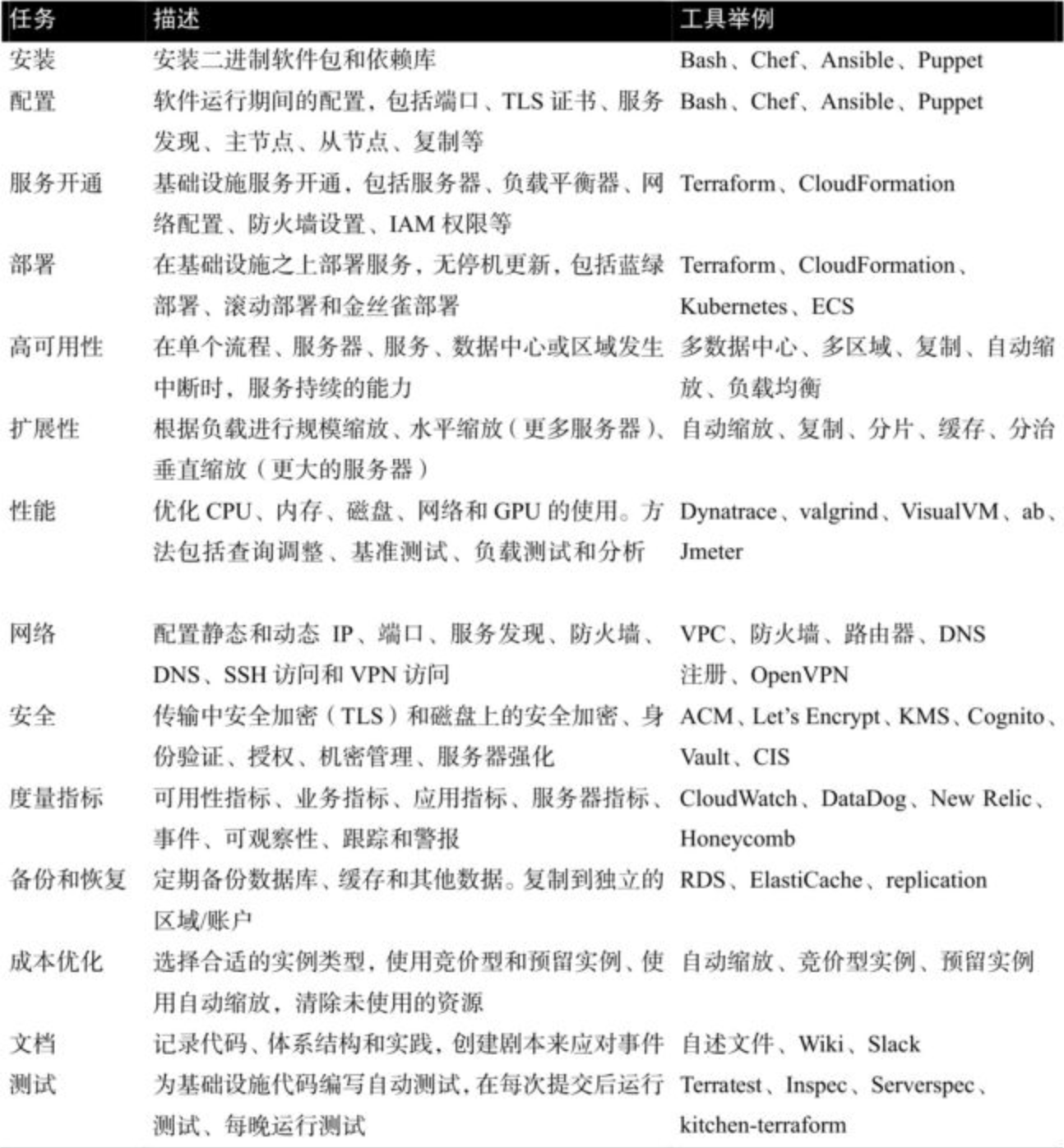
生产实践经验
Terraform 测试

源码解读
- TODO
[!WARNING] TODO
常见问题
释放状态锁时出错
例如,如果CI服务器在运行 terraform apply 命令期间崩溃,状态文件将永久处于锁定状态
❯ terraform force-unlock <LOCKID>
周边生态
- Terragrunt
- Terraforming
- cloud-nuke
属性测试
- kitchen-terraform
- rspec-terraform
- Serverspec
- Inspec
- goss
代码管理
- Atlantis:它会在提交时自动运行
terraform plan命令,并将命令输出添加到 MR 的注释中 - Terraform Enterprise
相关示例
在线资源
- Terraform Registry
- Reusable, composable, battle-tested Terraform modules
- A concise masterclass on how to write infrastructure code 🔺
- Infrastructure as code: running microservices on AWS using Terraform
- Agility Requires Safety
- Continuously Deploying Culture (Etsy presentation at Velocity London 2012)
- https://youtu.be/LdOe18KhtT4
- https://youtu.be/W71BTkUbdqE
- https://youtu.be/ROor6_NGIWU
- https://youtu.be/-vzp0Y4Z36Y
- https://youtu.be/NP9AIUT9nos
- https://www.ybrikman.com/speaking 🔺